

Fritzing — The Complete Guide: Documenting Arduino Circuits From Breadboard to PCB
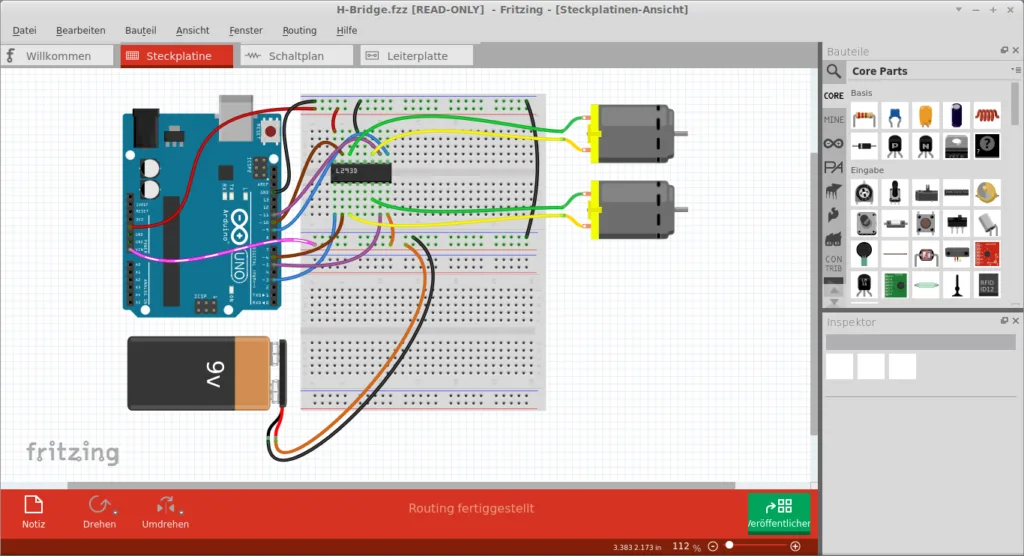
Fritzing is a tool for documenting and designing electronic circuits, with a unique starting point: you draw the circuit exactly as it looks on the breadboard, with the board, wires and components — and the program builds a schematic and a PCB from it.

Fritzing
Friends-of-Fritzing e.V.
Beginner-friendly electronics design — breadboard, schematic and PCB from one file.
Get it from the vendorThe three views
- Breadboard — a realistic drawing of the circuit, with a large library of Arduino boards, sensors and modules.
- Schematic — the electrical schematic, which updates with the connections.
- PCB — simple printed circuit board design, with Gerber export for ordering from a manufacturer.
Who it suits
Students, teachers and anyone building projects with Arduino: the breadboard picture is clear even to people who do not read schematics, so it works well for build instructions and project reports. You can also write code inside the program and upload it to the board.
Limitations
For professional PCB design — multilayer, with design rules and dense components — KiCad or LibrePCB is far more suitable. To simulate the circuit — SimulIDE. Fritzing's source code is open and free; the ready-built downloads on the official site come with a suggested contribution that funds development.

KiCad
KiCad Development Team
Open-source PCB design suite, from schematic to fabrication files, with no limit on layers or board area.
Get it from the vendor
LibrePCB
LibrePCB
Modern PCB design with a unified component library — schematic, layout and fabrication files.
Get it from the vendor
SimulIDE
SimulIDE (open-source project)
Real-time circuit simulator with PIC, AVR and Arduino microcontrollers, an oscilloscope and a serial monitor.
Get it from the vendor
Arduino IDE
Arduino
The official IDE for Arduino boards — write code, upload it to the board and watch sensors on the serial monitor.
Get it from the vendorThe bottom line
Fritzing is the most convenient way to document an Arduino project and explain it to others. When the circuit grows and gets serious, move to KiCad.