

Code_Aster and SALOME — The Complete Guide: Advanced Open-Source Finite Element Analysis
Code_Aster was developed by the French utility EDF for structural analysis of power plants, including nuclear plants, and is released as open source. It is an industrial-grade finite element solver with widely documented verification tests. SALOME is the graphical platform around it: geometry, meshing, analysis setup and results. Together they are called salome_meca.

Code_Aster
EDF
EDF industrial finite element solver — nonlinear, dynamic and thermo-mechanical, open source.
Get it from the vendor
SALOME
CEA / EDF / OPEN CASCADE
Geometry, meshing and post-processing platform for FEA, around external solvers.
Get it from the vendorWhat you can analyse
- Linear and nonlinear statics — plasticity, creep, large displacements and frictional contact.
- Dynamics — natural frequencies, spectral analysis for earthquakes, time history and harmonic response.
- Thermo-mechanics — heat transfer and coupling to thermal stresses.
- Fatigue and fracture — cumulative damage and fracture mechanics.
- Geomechanics and concrete — soil models and models for concrete and reinforced concrete.
What the work looks like
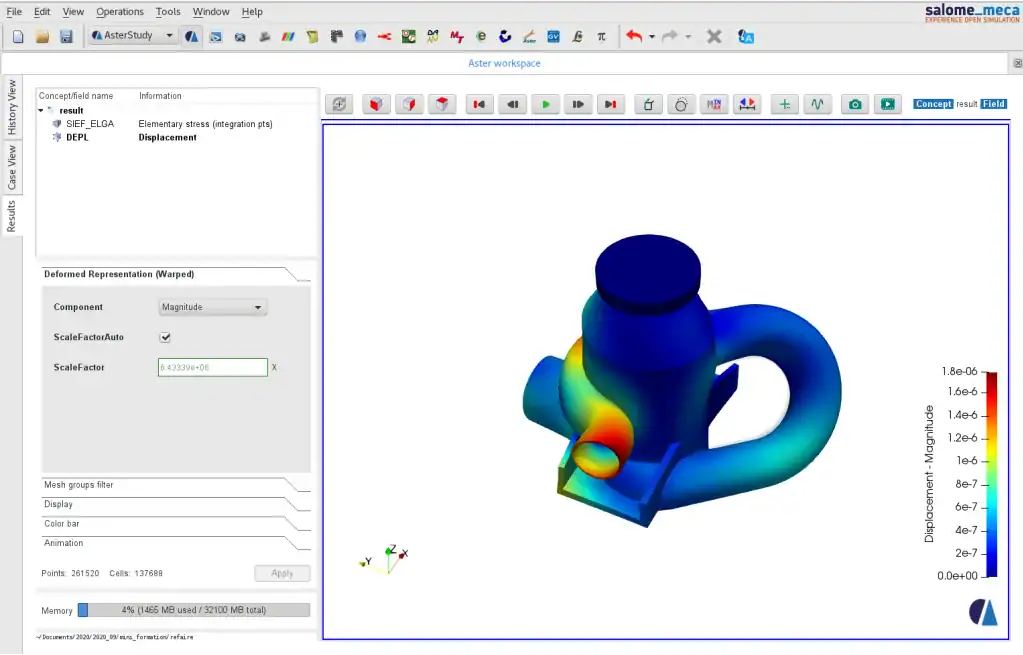
In SALOME you build or import geometry (STEP, IGES, BREP), create a mesh with groups for boundaries and loads, then define the analysis — with the AsterStudy graphical wizard or in a command file (.comm) in a Python-based language. After the run, results open in ParaVis, SALOME's viewer based on ParaView.

ParaView
Kitware / Sandia / Los Alamos
Large-scale simulation post-processing — slices, streamlines and animation.
Get it from the vendorInstallation
salome_meca is mainly distributed for Linux, as a ready package or a container. On Windows it can run through WSL or a virtual machine. A particularly easy way to start is CAELinux — a Linux distribution that comes with the tools installed.

CAELinux
CAELinux Project
A Linux distribution that ships with the whole computational engineering toolbox pre-installed.
Get it from the vendorWhat's missing
The learning curve is steep, and much of the original documentation is in French (English translations exist too). There are no design code checks. And the interface, although much improved, is less polished than ANSYS or Abaqus. In return you get a solver with no model size limit, no core limit and no cost.
Who it suits
Engineers and R&D departments who need professional nonlinear and dynamic analysis, graduate students, and offices working on Linux. If you are just starting with FEA and want a simple Windows interface, PrePoMax with CalculiX is an easier entry point.

PrePoMax
University of Maribor
Full graphical front end for CalculiX — meshing, materials, loads and results in one window.
Get it from the vendor
CalculiX
CalculiX Project
Open-source FEA with syntax close to Abaqus. The solver behind the FreeCAD FEM workbench.
Get it from the vendorBottom line
Code_Aster is one of the strongest answers to the question "is there professional FEA for free". It takes investment — but it has no ceiling.