

Free FEA Software — Real Alternatives to ANSYS Mechanical and Abaqus
An ANSYS Mechanical or Abaqus licence costs tens of thousands a year, and a small engineering office has to ask whether it really needs one. The short answer: the free solvers are genuinely good — what you pay for in commercial software is mostly convenience. One interface that does everything, contact that converges on its own, technical support and tidy documentation. If you are willing to put a little more work into setting up the model, professional finite element analysis is possible without paying.
Every program in this article is completely free, including for commercial use, with no time limit.
Start here — programs with a graphical interface
1. PrePoMax with CalculiX
The easiest way into free FEA. PrePoMax is a full graphical front end for CalculiX: import geometry from STEP, define materials, loads, boundary conditions and contact, generate a mesh and view stresses and displacements — all in one window, in a workflow that feels like commercial software. Developed at the University of Maribor in Slovenia and updated regularly.
What's missing: Windows only, and limited to what CalculiX can do.
2. Z88Aurora
German software from the University of Bayreuth, with a full graphical interface from CAD import to result display. It covers linear static, buckling, thermal and modal analysis. Its simplicity makes it a teaching tool, and it suits a student or an engineer who wants a quick result on a mechanical part without learning a solver syntax.
What's missing: nonlinearity and complex contact — for those you need the heavier tools below.
3. Elmer
A multiphysics solver from the Finnish IT Center for Science (CSC), with its own graphical interface. Its strength is coupling between domains: solid mechanics, fluid flow, heat transfer and electromagnetics in the same model. Particularly suited to thermo-mechanical problems and induction heating.

PrePoMax
University of Maribor
Full graphical front end for CalculiX — meshing, materials, loads and results in one window.
Get it from the vendor
Z88Aurora — Finite Element Analysis with a GUI
Universität Bayreuth
Free FEA package with a full graphical interface — CAD import, meshing, solving and results in one place.
Get it from the vendor
Elmer FEM
CSC — IT Center for Science, Finland
Multiphysics FEA — solids, flow, heat and electromagnetics — with its own graphical interface.
Get it from the vendorThe industrial solvers
4. CalculiX
The solver behind PrePoMax and behind FreeCAD's FEM workbench. Its input-file syntax is very close to Abaqus, so anyone who knows Abaqus feels at home. It handles static, dynamic, modal, buckling, heat transfer, geometric and material nonlinearity, and contact. It is the sensible default for a mechanical engineer.
5. Code_Aster
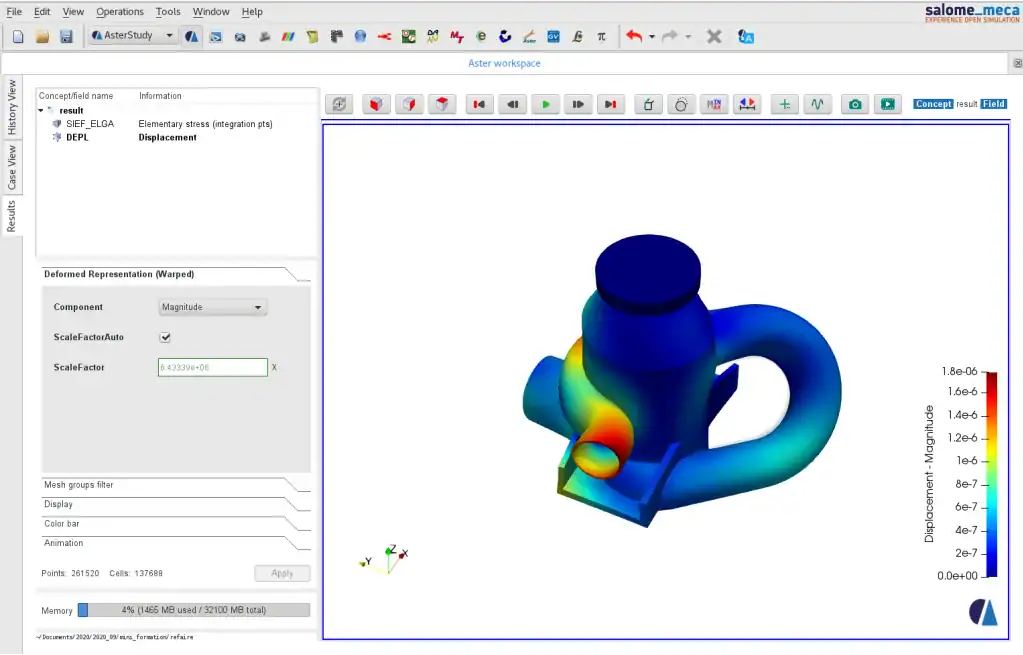
The solver of the French utility EDF, which actually uses it for safety calculations at power plants. It covers nonlinearity, dynamics, thermo-mechanics, fatigue and fracture mechanics at a level hard to find even in commercial software. It is usually driven through SALOME, which provides geometry, meshing and result display — the combined package is called Salome-Meca.
What's missing: a steep learning curve, and much of the documentation is in French.
6. OpenRadioss
An explicit solver for fast events: crash, impact, drop and blast. It is Altair's Radioss, released as open source in 2022 — an industrial solver from the automotive world, not an academic project.

CalculiX
CalculiX Project
Open-source FEA with syntax close to Abaqus. The solver behind the FreeCAD FEM workbench.
Get it from the vendor
Code_Aster
EDF
EDF industrial finite element solver — nonlinear, dynamic and thermo-mechanical, open source.
Get it from the vendor
SALOME
CEA / EDF / OPEN CASCADE
Geometry, meshing and post-processing platform for FEA, around external solvers.
Get it from the vendor
OpenRadioss
Altair (part of Siemens)
Explicit FEA for crash, impact and blast analysis — industrial grade, open source.
Get it from the vendorSeismic structural analysis
7. OpenSees
The central tool in earthquake engineering research, developed at UC Berkeley. Nonlinear and dynamic analysis of structures — pushover, time history, material and hinge models. It is driven by Python or Tcl scripts, with no graphical interface. For performance-based design there is no free alternative at this level.

OpenSees
Pacific Earthquake Engineering Research Center, UC Berkeley
Nonlinear and dynamic structural analysis driven by scripts, from the earthquake engineering world.
Get it from the vendorFor those who write code
Four tools where you state the equations themselves rather than pick from a list of analysis types. They suit problems that have no button in commercial software, and research:
FEniCS and SfePy — variational formulation directly in Python. FreeFEM — a dedicated language close to mathematical notation. Netgen / NGSolve — high-order elements that give accuracy on far coarser meshes.
FEniCS
FEniCS Project
Solve partial differential equations by writing the variational form directly.
Get it from the vendor
SfePy
SfePy Project
A finite-element package for solving PDEs in Python.
Get it from the vendor
FreeFEM
Sorbonne Université / Inria
Solves partial differential equations in a language close to the mathematical formulation.
Get it from the vendor
Netgen / NGSolve — Multiphysics Finite Elements
TU Wien / NGSolve Project
High-order finite element mesher and solver for mechanics, flow and electromagnetics.
Get it from the vendorSpecialised fields
FEBio is built for biomechanics and soft materials — hyperelastic and viscoelastic models. MBDyn solves multibody dynamics, including flexible bodies — mechanisms, suspensions and rotors.
FEBio
University of Utah / Columbia University
FEA for biomechanics and soft materials — hyperelastic, viscoelastic and tissue-implant contact.
Get it from the vendor
MBDyn — Multibody Dynamics
Politecnico di Milano
Solver for the dynamics of multibody mechanical systems, including flexible bodies and aeronautical systems.
Get it from the vendorThe helpers everyone needs
Gmsh is the standard mesh generator of the open-source world, and most of the solvers above read its format. ParaView displays results from all of them — slices, isosurfaces and animation over time.

Gmsh
Gmsh Project
FEA mesh generator with built-in geometry and scripting — standard infrastructure for open numerical work.
Get it from the vendor
ParaView
Kitware / Sandia / Los Alamos
Large-scale simulation post-processing — slices, streamlines and animation.
Get it from the vendorSo which one
Mechanical part, static or modal: PrePoMax. Heavy nonlinear problem or complex contact: Code_Aster through SALOME, or CalculiX directly. Crash and impact: OpenRadioss. Structure under seismic load: OpenSees. Thermo-mechanical or electromagnetic coupling: Elmer. Teaching and learning: Z88Aurora.
What is really missing compared with commercial software
Not the quality of the physics — it is the same physics. What is missing is one interface that ties every step together, contact that converges without manual tuning, and support you can pick up the phone to. In an office running dozens of models a week, the time saved by commercial software can justify the price. In an office running one model a month, it almost never does.
Quick comparison
| Software | Licence | How you work | Best for | Guide |
|---|---|---|---|---|
| PrePoMax | Open source, commercial use OK | Full GUI on Windows | Statics, contact, nonlinear — the best place to start | Guide |
| Code_Aster + SALOME | Open source, commercial use OK | Through SALOME-Meca | Complex industrial problems, dynamics, thermo-mechanics | Guide |
| Elmer FEM | Open source, commercial use OK | ElmerGUI | Multiphysics: heat, electromagnetics, flow and coupling | Guide |
| Z88Aurora | Free, commercial use OK | GUI | Quick analysis of mechanical parts | |
| OpenSees | Open source, commercial use OK | Scripts (Tcl/Python) | Earthquake engineering, nonlinear structural analysis | Guide |
| FEniCS / FreeFEM | Open source, commercial use OK | Code | Custom equations and research | FreeFEM guide |
| Ansys Student | Students only | Full GUI | Learning the Ansys interface, with a model-size limit | Guide |
| Abaqus Learning Edition | Personal learning only | Full GUI | Learning Abaqus, not for commercial work | Guide |
Frequently asked questions
What is the best free FEA software for beginners?
PrePoMax. It gives CalculiX a complete graphical interface — STEP import, meshing, materials, loads and results in one window — and it is allowed for commercial work.
Can I use these tools on commercial projects?
The open-source tools in the table, yes. Ansys Student and Abaqus Learning Edition are for learning only and must not be used for client work.
Is there a real free alternative to ANSYS Mechanical?
For linear and nonlinear structural analysis, yes: CalculiX through PrePoMax, and Code_Aster, cover most of the work. What is missing is mainly convenience — a single integrated interface, automated meshing and ready-made reports.
What should I use to view the results?
ParaView reads most result formats, and Gmsh generates meshes for most solvers.