

GNU Octave — The Complete Guide: A Free MATLAB Alternative for Engineers
GNU Octave is an open-source numerical computing language with syntax that is largely compatible with MATLAB. In practice: an .m file you wrote in a university course, or a script a colleague sent you, will run in Octave in most cases without changing a line — with no licence, no registration and for any use.

GNU Octave
GNU Project
Numerical computing in MATLAB-compatible syntax — matrices, equations, signals and plots.
Get it from the vendorWhat Octave does well
- Matrices and linear algebra — solving systems of equations, eigenvalues, decompositions. Exactly what you need for a stiffness matrix or a vibration analysis.
- Differential equations — ode45 and family, for dynamics, control and time response.
- Plots — plot, surf, contour, subplot, with export to image and PDF.
- Files — reading and writing CSV, .mat files and measurement data.
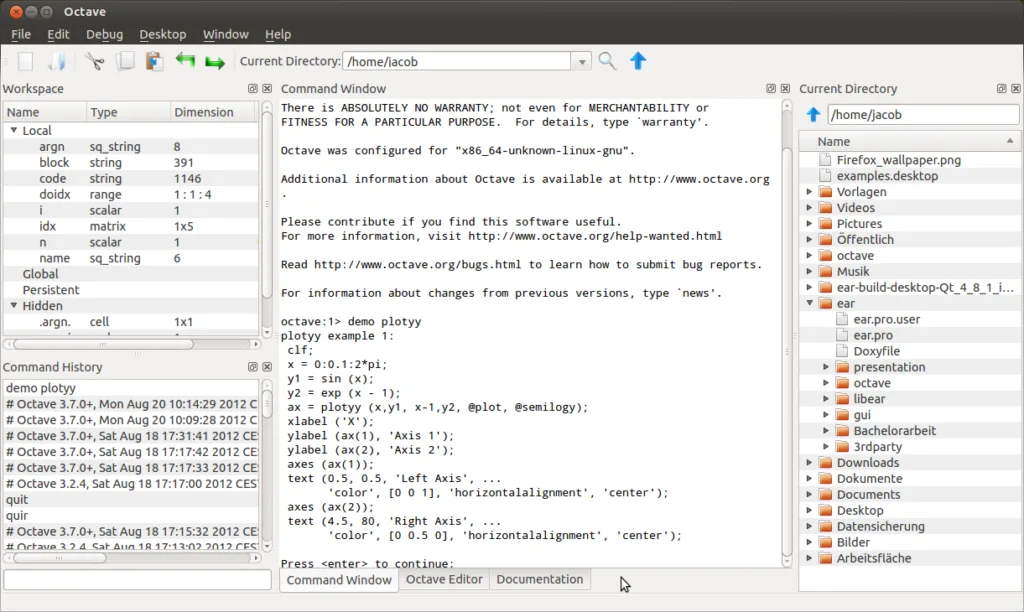
- Graphical interface — code editor, command window, workspace and history, in a style familiar from MATLAB.
Packages
More capability comes as packages (pkg install): control for control systems and transfer functions, signal for signal processing and filters, statistics, optim for optimisation, and symbolic for symbolic maths.
What's missing
There is no Simulink — for block-based simulation you need Scilab with Xcos or OpenModelica. Some MATLAB toolboxes have no full equivalent. Octave is slower on heavy loops, so write vectorised code. And there are small syntax differences — Octave accepts syntax MATLAB rejects (such as # comments or the ++ operator), so code meant to go back to MATLAB should be written carefully.

Scilab
Dassault Systèmes / Scilab Enterprises
Numerical computing with Xcos — block-diagram simulation of dynamic systems alongside scripting.
Get it from the vendor
OpenModelica
Open Source Modelica Consortium
Simulate multi-domain physical systems with the Modelica language.
Get it from the vendorWho it suits
Students who want to keep running their course code after the university licence expires. Engineers who need repeat calculations — design tables, measurement processing, vibration analysis — without buying MATLAB for every seat. And lecturers who want every student to be able to run the material at home.
When to choose something else
If you are starting from scratch with no existing MATLAB code, Python with NumPy and SciPy gives a wider ecosystem. For convenient symbolic maths — wxMaxima. And for quick plots from the command line — gnuplot.

Python
Python Software Foundation
The language behind most modern engineering computation, and its full ecosystem.
Get it from the vendor
wxMaxima — Symbolic Algebra
Maxima Project / wxMaxima
Graphical front end to the Maxima computer algebra system — derivatives, integrals and equations in mathematical notation.
Get it from the vendor
gnuplot
gnuplot Project
Publication-quality plotting driven from scripts.
Get it from the vendorBottom line
If you have MATLAB code or MATLAB working habits, Octave is the shortest way to keep working for free.